Quickstart
This walkthrough takes you from a one-line idea to a running build. You will install Drydock, describe what you want in plain English, pick an autonomy level, and approve the three gates that stand between your idea and a deployed system.
Drydock is an open-source plugin for Claude Code (version 2.5.0). It turns Claude Code into a team of 19 specialized agents coordinated by one orchestrator — you stay in the strategist's seat and approve at the checkpoints.
:::info Prerequisites Claude Code is all you need to install and route. Git, Docker, and Docker Compose are used by the build and ship phases (git-worktree isolation, container builds, IaC) — install them if you plan to run a full build. :::
1. Install
From inside Claude Code, register the marketplace and install the plugin:
/plugin marketplace add sundarshahi/drydock
/plugin install drydock@drydock
This registers the skills, hooks, and shared protocols. No local clone required.
2. Describe what you want
You don't pick a command or a mode. Just describe the outcome in plain English:
Build a SaaS for booking dog walkers — auth, payments, and a dashboard.
Drydock reads your request, classifies it (here, a Full Build), and runs the pipeline — pausing only at the points where your judgment matters.
3. Pick an autonomy level
Every Full Build opens by asking you to choose an autonomy level. This is the first decision Drydock surfaces, before any agent runs or any code is written. It controls how many of the smaller, agent-level questions get surfaced to you between the gates — higher autonomy means fewer interruptions. The three pipeline gates always fire regardless.
| Level | Agent questions | Use when |
|---|---|---|
| Autopilot | None — auto-resolves and reports what it chose | Speed matters; you trust the pipeline |
| Copilot (default) | 1–2 per agent — only key or irreversible calls | Best balance for most builds |
| Checkpoint | All major decisions surfaced before proceeding | Complex or high-stakes builds |
| Manual | Every decision, reviewed before any code is written | Full control, maximum oversight |
When in doubt, take Copilot — the recommended default. Drydock asks once (arrow keys + Enter), then propagates your choice to all 19 agents.
4. Approve the three gates
A full build flows through six phases — DEFINE → BUILD → HARDEN → SHIP → LAUNCH → SUSTAIN — and the agents work autonomously inside each one. You weigh in at exactly three human approval gates:
| Gate | Phase | What you approve |
|---|---|---|
| Gate 1 | DEFINE | The requirements (BRD) — what's being built |
| Gate 2 | DEFINE | The architecture — how it's being built |
| Gate 3 | SHIP | Production readiness — whether it's safe to ship |
Everything between the gates is autonomous. At each gate Drydock verifies the agents' receipts (and the artifacts they claim) before presenting the decision to you.
:::warning Gate 3 is blocking Production readiness is blocked on failing tests, coverage, performance budget, compliance controls, or architecture-boundary violations. A breach can only be cleared with a logged "accepted with justification" override receipt — Drydock won't quietly offer "Ship it" on a broken gate. :::
:::note Not sure what you're approving? At any gate you can select "Chat about this" and Drydock invokes the Polymath in plain-language mode. It reads the gate artifacts, explains them, answers your questions, then re-presents the original options when you're ready. :::
5. (Optional) Run a smaller mode or one agent
Not every request runs the whole pipeline. Drydock infers a mode from what you ask for — there are 14 execution modes (Full Build plus 13 others, with a Custom fallback). A code review or a single feature skips straight to the relevant agents, with fewer (or zero) gates:
Add OAuth login to my existing app          # → Feature mode
Write tests for the payments service         # → Test mode
Set up CI/CD with Docker and Terraform       # → Ship mode
Audit this codebase before launch            # → Harden mode
You can also call any agent directly by name, bypassing the orchestrator's routing:
/drydock:security-engineer audit my API for OWASP Top 10
/drydock:code-reviewer review my code
/drydock:technical-writer write API docs
A single-agent run reports what it checked, what it skipped and why, and a pass/fail verdict:
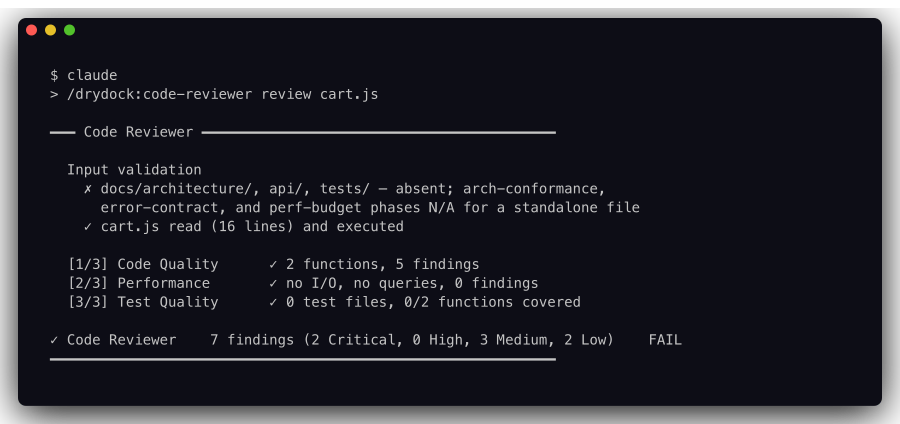
Note the FAIL verdict and the honest "N/A" lines: agents report what they could not check rather than silently passing. Here there was no docs/architecture/ or test suite to review against, so those phases were declared out of scope instead of being marked green.
For everyday tasks, single-agent and lightweight modes skip the plan-confirmation step and start immediately — the overhead of asking isn't worth it.
:::tip Run a single phase On an existing project you can run one phase in isolation:
/drydock just define     # requirements + architecture only
/drydock just harden     # security + QA + review (requires BUILD output)
/drydock just ship       # IaC + CI/CD (requires HARDEN output)
:::
What you end up with
A real system — tested, secured, documented, and deployed — plus a drydock/ workspace in your project holding pipeline state and per-agent artifacts. Every agent writes a JSON receipt as proof of its work, and the gates verify those receipts before opening.
Even a single-agent run leaves its evidence on disk. The code review above wrote a full report plus findings split by severity:
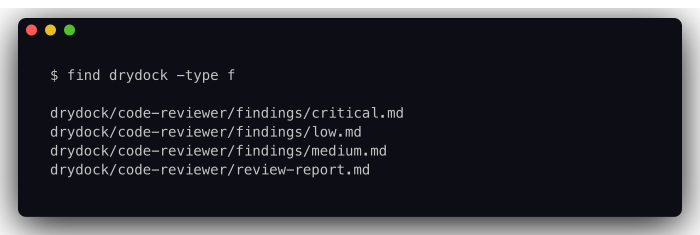
A full build fans this out to one directory per agent that ran, alongside .orchestrator/ for pipeline state and receipts.
Next steps
- How it works — the orchestrator, the six phases, receipts, and re-anchoring.
- Modes — all 14 execution modes and how requests are classified into them.