Installation
Drydock is an open-source plugin for Claude Code. It installs from a plugin marketplace in two commands — no local clone required. This page covers the prerequisites, the install commands, what gets registered, how updates work, and how to run an unreleased checkout for local development.
:::info Current version This page documents Drydock 2.5.0. The repository lives at github.com/sundarshahi/drydock. :::
Prerequisites
Claude Code is the only thing you need to install Drydock and route work to its agents.
| Tool | Required for | When you need it |
|---|---|---|
| Claude Code | Installing and running Drydock | Always |
| Git | Worktree isolation during builds | The BUILD / SHIP phases |
| Docker | Container builds | The HARDEN / SHIP phases |
| Docker Compose | Local multi-service orchestration | The HARDEN / SHIP phases |
Git, Docker, and Docker Compose are used by the build and ship phases for git-worktree isolation, container builds, and infrastructure-as-code. Install them if you plan to run a full build; they are not needed just to install the plugin or route requests.
If you only want to try Drydock's planning and routing — for example a code review or an architecture pass — Claude Code alone is enough. You can add Git and Docker later when you reach a phase that needs them.
Install
Run both commands from inside Claude Code. The first registers the Drydock marketplace; the second installs the plugin from it.
/plugin marketplace add sundarshahi/drydock
/plugin install drydock@drydock
The drydock@drydock syntax is <plugin-name>@<marketplace-name> — both happen to be named drydock.
That's it. Describe what you want in plain English and Drydock takes over:
Build a SaaS for booking dog walkers — auth, payments, and a dashboard.
Drydock picks an execution mode to match your request, asks you to choose an autonomy level, then runs the pipeline — pausing only at the three approval gates.
What the marketplace install registers
Installing drydock@drydock registers the full plugin into your Claude Code environment:
- 19 agents, each invocable as
drydock:<skill>. Fifteen run as isolated subagents; the orchestrator (drydock) plus three planning agents —product-manager,solution-architect, andpolymath— run in-context as skills. - Hooks, including the
secret-guardhook that blocks secret writes and commits and scans staged diffs. - Shared protocols that enforce architecture boundaries, security defaults, grounding, and the gate logic.
No files are cloned into your project at install time. Drydock scaffolds a drydock/ workspace directory inside a project only when you actually start a run.
Verify the install
Confirm the plugin is installed and enabled from your shell:
claude plugin list
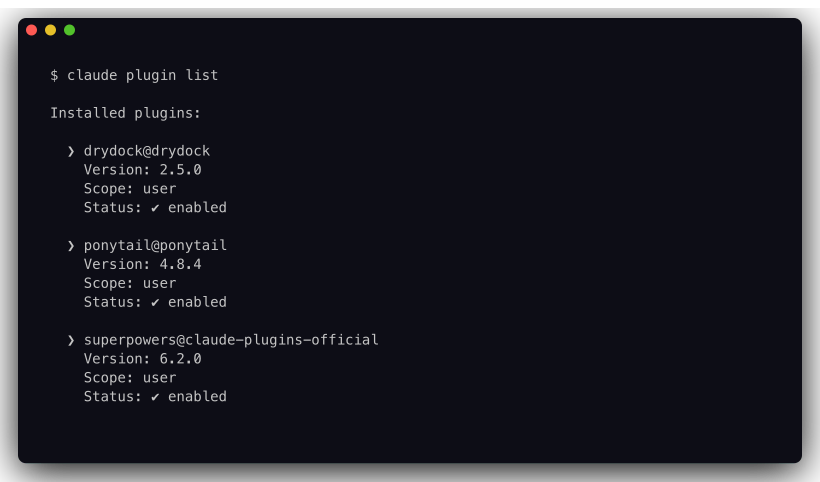
Look for drydock@drydock with Status: ✔ enabled. If it says disabled, run claude plugin enable drydock@drydock.
To see exactly what got registered — and what it costs you in context — ask for the plugin's details:
claude plugin details drydock@drydock
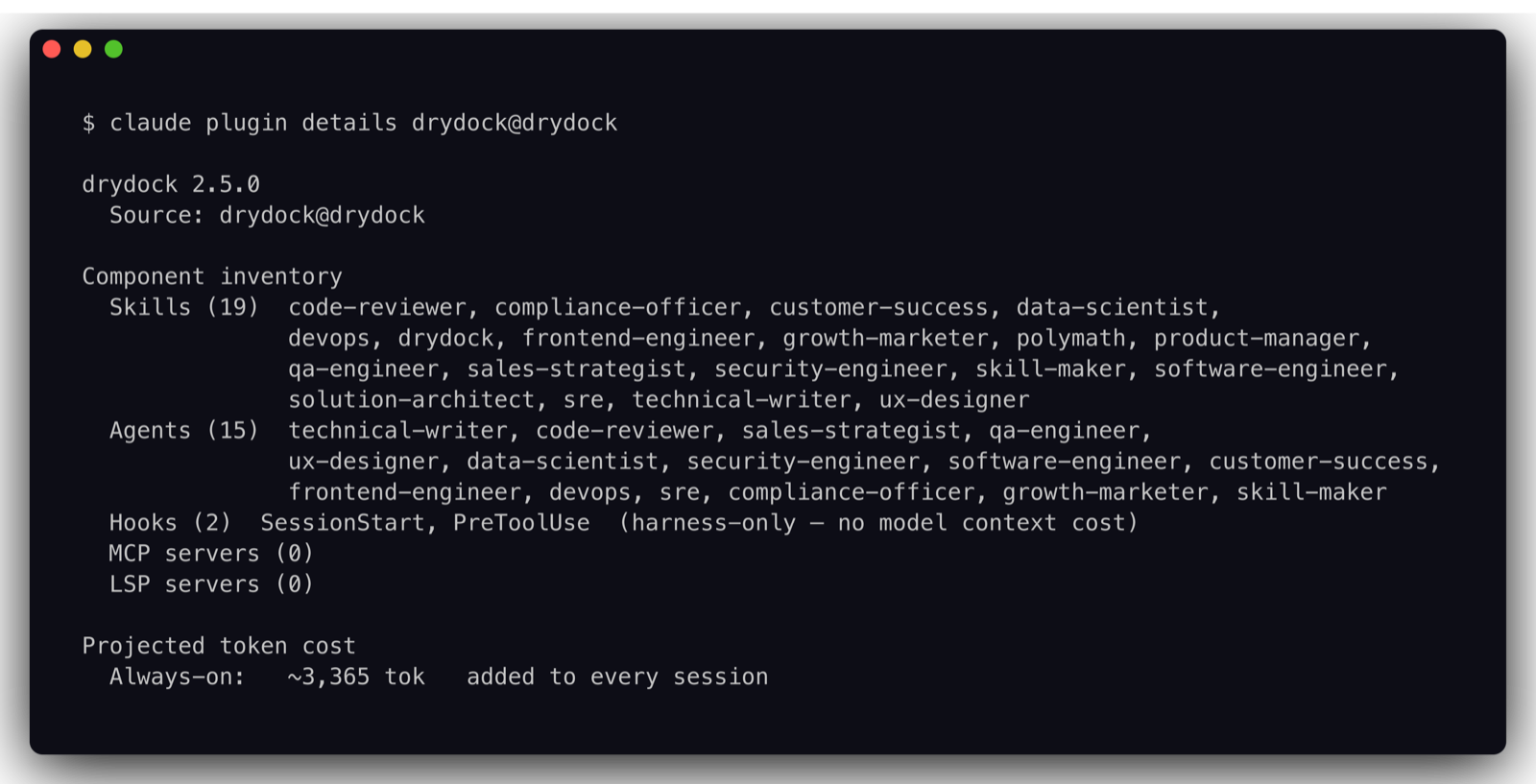
This is the fastest way to confirm all 19 skills and 15 subagents loaded. The always-on figure is what Drydock adds to every session just by being installed; the per-component on-invoke cost (shown further down the real output) is paid only when a skill or agent actually fires.
:::tip Check from inside Claude Code instead
Type /plugin in a Claude Code session for the same information in an interactive menu, or start typing /drydock: — if the agent list autocompletes, the skills are loaded.
:::
How updates work
The marketplace entry is version-pinned — marketplace.json records the plugin version (currently 2.5.0), so you always install a known, reproducible build rather than whatever is on the tip of the default branch.
To move to a newer release, refresh the marketplace and reinstall:
/plugin marketplace update drydock
/plugin install drydock@drydock
The update pulls the latest pinned version from the marketplace; reinstalling activates it.
The same thing works from your shell, without opening Claude Code:
claude plugin marketplace update drydock
claude plugin update drydock@drydock
Because the version is pinned in the marketplace entry, an install is deterministic: two people who add the marketplace and install the plugin at the same time get the same Drydock build.
:::warning Restart to apply
A plugin update takes effect on the next Claude Code session — restart Claude Code after updating, then re-run claude plugin list to confirm the new version.
:::
Disable, enable, or uninstall
Drydock adds roughly 3,365 tokens to every session just by being installed. If you want that context back on a project where you aren't using it, disable it rather than uninstalling — disabling is reversible and keeps the download:
claude plugin disable drydock@drydock
claude plugin enable drydock@drydock
To remove it entirely:
claude plugin uninstall drydock@drydock
Both commands default to the user scope. If you installed Drydock into a project or a local scope, pass it explicitly — --scope project or --scope local — or the command will look in the wrong place and report nothing to remove.
:::note What uninstalling does not touch
Uninstalling removes the plugin, not your work. Any drydock/ workspace directory already scaffolded inside a project — receipts, BRDs, review reports, findings — stays exactly where it is. Delete it yourself if you want it gone.
:::
Troubleshooting
| Symptom | Cause | Fix |
|---|---|---|
/plugin install drydock@drydock says the plugin can't be found | The marketplace was never added, or was added under a different name | Run claude plugin marketplace list and confirm drydock is there; if not, re-run /plugin marketplace add sundarshahi/drydock |
/drydock: doesn't autocomplete any agents | The plugin is installed but disabled, or the session started before the install | Check Status in claude plugin list, run claude plugin enable drydock@drydock if needed, then restart Claude Code |
claude plugin list shows an older version after an update | The update was fetched but the session is still running the old build | Restart Claude Code — updates apply on the next session |
claude plugin uninstall reports nothing to remove | Wrong scope | Re-run with --scope project or --scope local |
| A run stops at a phase that needs Git or Docker | Optional prerequisites aren't installed | Install the tool from the prerequisites table and re-run the phase |
Local development (unreleased checkout)
To run an unreleased checkout — for example a feature branch, or the tip of main — instead of the marketplace build, clone the repository into Claude Code's plugins directory and launch Claude Code with that plugin directory:
git clone https://github.com/sundarshahi/drydock ~/.claude/plugins/drydock
claude --plugin-dir ~/.claude/plugins/drydock
This loads the plugin straight from your working tree, so any local edits take effect immediately. Use it for contributing or testing changes; for everyday use, prefer the marketplace install above so you stay on a pinned, reproducible version.
A local checkout tracks whatever is in your working tree, not a pinned release. Pull changes yourself to stay current, and expect unreleased behavior to differ from the marketplace build.
Next steps
- Learn the pipeline and the three approval gates in How it works.
- Run your first build with the Quick start guide.